The settings window lets you define animation events, hitbox types, hitbox colors, and define how hitboxes will interact with each other.
Settings is one button press away at the top of your editor window.

After adding or removing hitbox types and applying changes you will likely have to reconfigure your collision matrix entirely. If you don’t have a good memory take a screenshot of your old collision matrix before applying changes to hitbox types.
Using the Collision Matrix you will decide which characters receive events when certain types of hitboxes intersect and whether or not it fires any events at all.
When placing hitboxes we know that we won’t care if some types ever intersect. For example we don’t care if two character’s have their guard boxes intersect. So in our collision matrix we make sure the Guard⨯Guard is left blank so we will not receive events if they ever intersect. In the collision matrix toggle boxes we can configure a hitbox pair to have no events sent, one event sent to either side, or both sent an event.
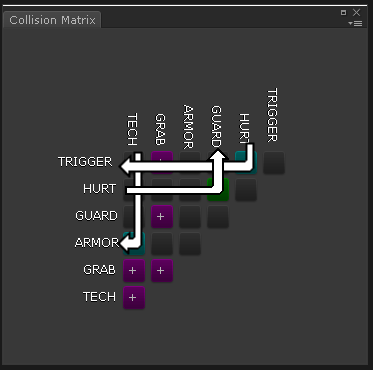
In the demo GRAB is setup as a two way event with itself. This is so when two players grab each other at the same time we want to cancel the grab and stagger both players.
Because these hitboxes are still using Unity’s physics system; if you are making an action RPG with a lot of enemies and you don’t want enemies to hit each other, you can put those enemies on the same physics layer where none of their colliders will collide with each other. You can also use your physics layers to setup teams or factions for your characters and disable friendly fire for those characters.
